Bundle multiple MCP servers behind a single MCP Gateway endpoint with a unified tool surface, aliases, and per-team tool access controls.
Create a single client-facing MCP endpoint that bundles one or more MCP Servers. Clients connect to the MCP Gateway URL and get a unified tool surface without knowing individual server URLs or authentication details. The gateway acts as a virtual MCP server: it aggregates tools from multiple upstream servers behind one address.
This page covers MCP Gateways, client-facing endpoints that bundle upstream MCP Servers Orq connects to. This is a different feature from Orq’s own MCP server, which coding assistants connect to for workspace administration.
MCP Portal is the AI Gateway area that manages MCP Gateways and MCP Servers. Open it at AI Gateway > MCP Portal in the sidebar; the MCP Gateways tab lists every gateway in the workspace, one row per gateway:
Name: the gateway key
Servers: the linked MCP Servers, as a stack of server avatars, with a +N count when the list is long
Exposed tools: how many tools the gateway exposes to clients
Access: which projects can use the gateway
Public URL: the endpoint clients connect to, with a copy control
Created by: the member who created the gateway
Gateway list row menu: View details, Edit, Delete. The detail page overflow menu offers Edit, Share, Delete, where Share copies a link to the page.
How It Works
A virtual MCP server is a single endpoint that gives clients access to tools from multiple upstream MCP Servers. The gateway aggregates these servers behind one address, handles authentication and routing, and resolves tool-name conflicts internally. Clients connect to one URL and see all linked tools as if they came from one provider.
Use Cases
Exposing multiple MCP servers through a single endpoint for clients that cannot manage multiple connections.
Aliasing server tools under consistent names so clients do not break when upstream tool names change.
Governing tool access per team: admins build an MCP Gateway from a selected subset of tools across several MCP Servers, so the Marketing team and the Research team can share the same servers while reaching different tools.
Set Up an MCP Gateway
AI Studio
API & SDK
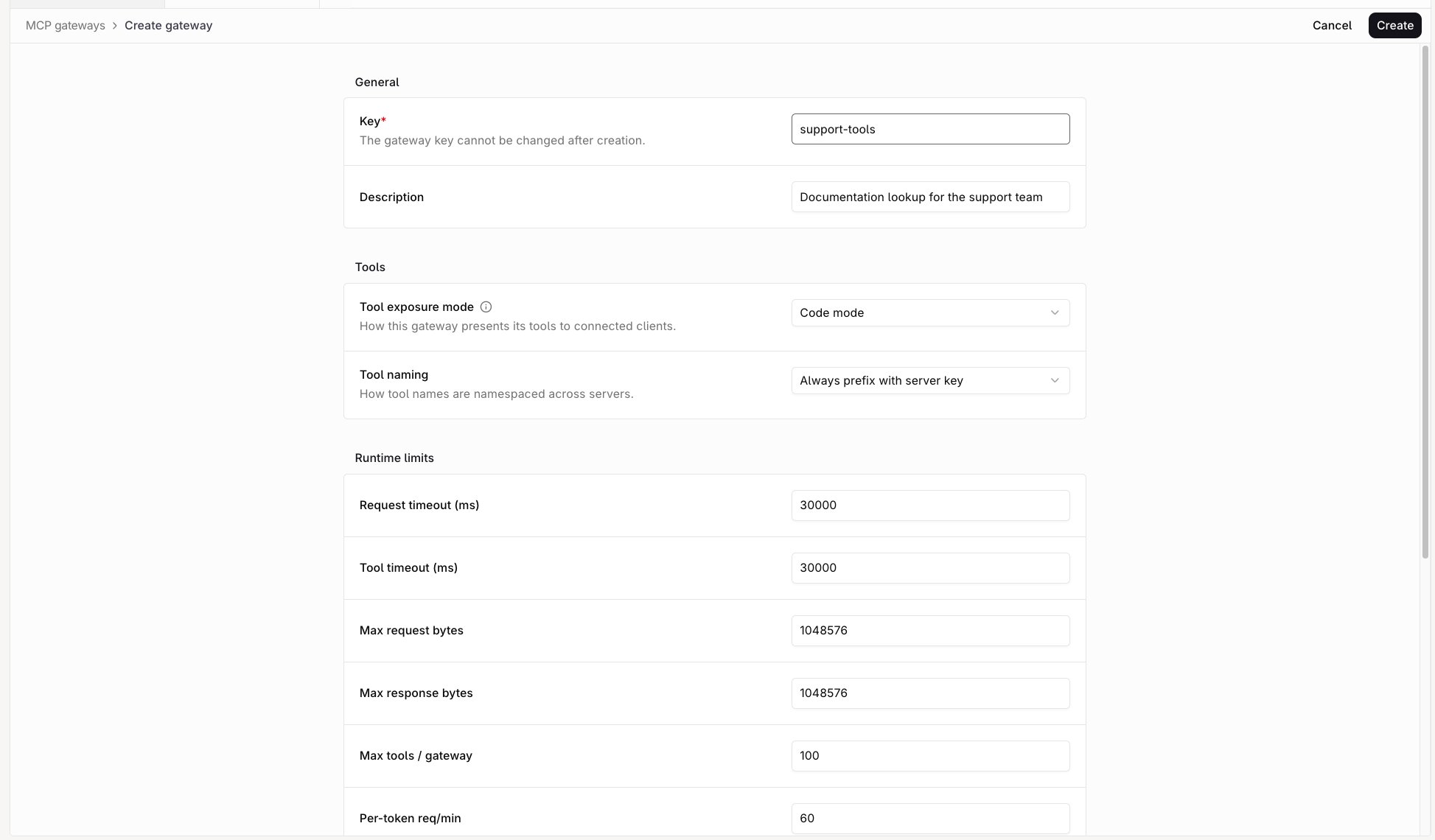
Open AI Gateway > MCP Portal, select the MCP Gateways tab, then click MCP Gateway.
Create MCP Gateway form
General
Description (optional): a note about what this MCP Gateway provides.
Key (required): lowercase letters, digits, - and _, up to 64 characters. Forms the MCP Gateway URL and cannot change after creation.
Tools
Tool exposure mode: how the MCP Gateway presents tools to connected clients. Code mode (default) exposes three meta-tools that handle discovery and execution internally (see Code mode). Direct exposes each upstream tool individually.
Tool naming: how tool names are namespaced across servers. Always prefix with server key (default) prefixes all tools with the server’s key, or its alias if one is set per-link. Prefix only on collision only prefixes conflicting names.
Runtime limits
Each cap listed under Runtime Limits, filled in with its default.
mode and tool_naming mirror the form’s tool settings:
Tool exposure mode: MCP_GATEWAY_MODE_CODE (Code mode, the default) or MCP_GATEWAY_MODE_DIRECT (Direct).
Tool naming: MCP_TOOL_NAMING_PREFIX_WITH_SERVER_KEY (Always prefix with server key, the console default) or MCP_TOOL_NAMING_PREFIX_ON_COLLISION (Prefix only on collision, the API default).
Orq.ai redirects to the Toolset tab of the new MCP Gateway. Click + Add server to link any server already configured in MCP Servers. Only servers that have completed their initial sync can be linked.Through the API, PATCH /v2/mcp-gateways/ with server_links replaces the linked servers. An empty server_links array changes nothing; send clear_server_links: true to unlink every server. The two fields cannot be combined.expected_updated is the gateway’s current updated value. Send it whenever the update replaces server_links with a link that carries resource_exposure, or re-enables a link that exposes resources: without it the gateway rejects the write. A value that no longer matches the stored one is rejected with COMMON_ARTIFACT_STATE_CONFLICT, so read the gateway again and resend.
Link only MCP Servers whose project access covers the MCP Gateway project access. An MCP Gateway on All projects therefore needs MCP Servers on All projects; change a server’s own scope from its Settings tab, as described in MCP Servers.
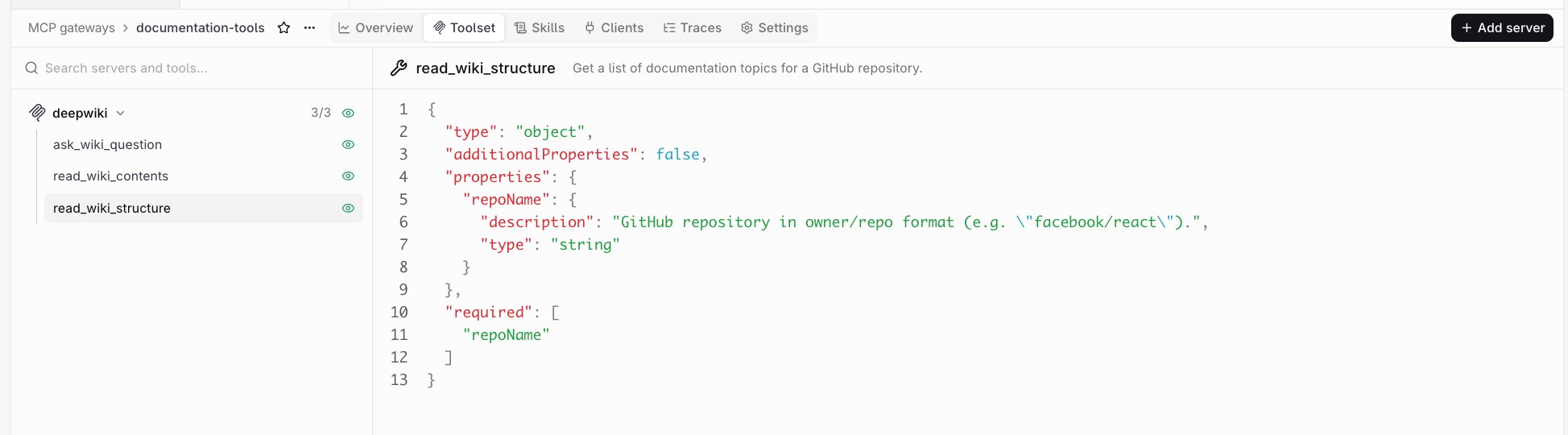
Toolset tab of an MCP Gateway with a linked server
The MCP Gateway detail page has six tabs:
Overview: traffic for the MCP Gateway and the Connect section with the command clients use to reach it.
Toolset: linked servers and the tools each one exposes, as a tree with a detail panel.
Filter with Search servers and tools…. Each server row shows N / M tools exposed; expand it for the tool list and an toggle per tool. The toggle on the server row exposes or hides every tool currently listed.
Toggles apply immediately. Selecting a tool opens its description, input schema, and Open world, Read only, Idempotent, or Destructive badges in the detail panel.
The server row menu carries Edit alias, Remove from gateway, and, when the upstream server added tools, Expose new tools and Hide new tools.
Skills: the skills the gateway serves as SKILL.md files, from the workspace Skills and from linked MCP Servers that publish skills, each with an exposure toggle. Select a file to preview its markdown.
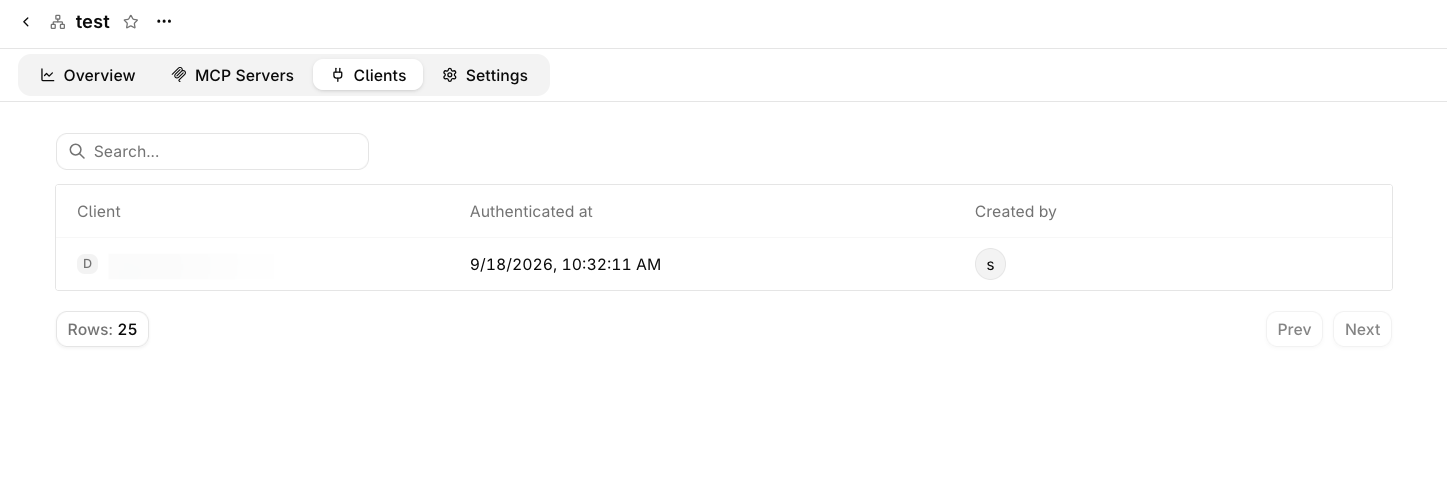
Clients: MCP clients authorized through OAuth, with the option to revoke their access.
Traces: the tool calls the gateway served, as individual traces scoped to this gateway.
Through the API, PATCH /v2/mcp-gateways/ with server_links replaces the linked servers. An empty server_links array changes nothing; send clear_server_links: true to unlink every server. The two fields cannot be combined.Each entry in server_links:
Field
Required
Meaning
mcp_server_id
Yes
Upstream MCP Server this gateway aggregates.
alias
Yes
Prefix used instead of the server key when namespacing this server’s tool names; unique within the gateway.
tool_exposure
Yes
Which of the server’s tools this gateway exposes. mode takes MCP_TOOL_EXPOSURE_MODE_ALL, MCP_TOOL_EXPOSURE_MODE_SELECTED or MCP_TOOL_EXPOSURE_MODE_NONE, with tool_ids and excluded_tool_ids for a selection and read_only to keep only tools the upstream annotates as read-only.
enabled
No
Whether the link contributes tools to the gateway. It defaults to false, so a link that omits it serves nothing.
skill_exposure
No
Which of the server’s skills the gateway serves. mode takes the same three values as tool_exposure, with skill_uris for a selection; unset serves none.
resource_exposure
No
Which resources and templates the gateway exposes. Omission keeps an existing link’s selection and exposes none on a new link.
This links one server and exposes two of its tools:
Workspace roles decide who can view and manage the MCP Portal. MCP permissions follow the role and are not configurable per team or per gateway.
Action
Admin
Developer
Researcher
View MCP Gateways and MCP Servers
✓
✓
✓
View authorized clients
✓
✓
✓
Create and edit MCP Servers
✓
✓
Delete MCP Servers
✓
Create, edit, and delete MCP Gateways
✓
Link servers and choose which tools a gateway exposes
✓
Set gateway sharing, plugins, guardrails, and runtime limits
✓
Revoke an authorized client
✓
Authorizing a client is self-service: the person signing in approves it in the browser and holds the resulting token. Revoking an authorized client requires Admin.Role permissions apply to people. API keys are authorized separately, by the access granted to the key itself.
Project Access
AI Studio
API & SDK
An MCP Gateway is visible to the projects that may use it. The Access column of the gateway list shows the current scope: All Projects, No projects, or the shared project names. A new gateway is shared with every project.Change the scope on the Settings tab. Under Access control, pick All projects to share the gateway with the whole workspace, or Custom and set each project to Enabled or Disabled.
The sharing block on create or update replaces the scope. Send all_projects to share the gateway with every project, or selected.project_ids to list the projects that may use it. A Disabled project stops reaching the gateway.
Send all_projects instead of selected to share the gateway with every project.Three optional booleans in the same sharing block decide what a shared project may do:
allow_version_pin: a project may pin a specific version instead of tracking the latest one.
allow_fork: a project may duplicate the gateway into a detached project-owned copy.
auto_grant_new_projects: projects created after the sharing config is applied are granted automatically.
The SDKs take the camelCase spellings: allowVersionPin, allowFork and autoGrantNewProjects.
Project scope sets which projects may reach the gateway. An API key reaches the gateways of the projects it is scoped to; a key minted for an Agent session also reaches only the gateways attached to that Agent.
Delete a Gateway
AI Studio
API & SDK
Delete a gateway from the Delete item in the gateway list row menu, the Delete item in the detail page overflow menu, or the Delete gateway button on the Settings tab. Each asks for confirmation.
The Settings tab holds the plugins, Guardrails, and runtime limits that govern what the MCP Gateway forwards and how much it forwards. The same guardrails and runtime limits fields appear on the Create MCP Gateway form.
Plugins
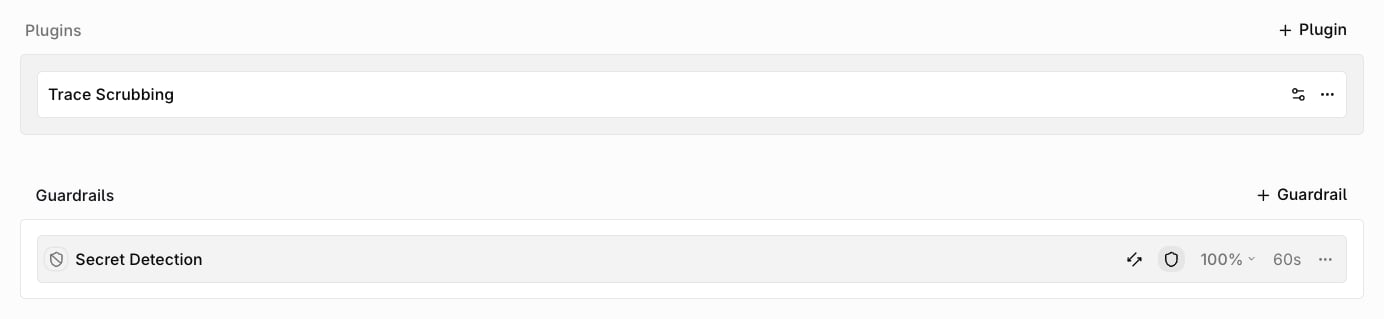
Plugins attached to an MCP Gateway run on every tool call it serves. Guardrail Rules do not run on tool calls. To check tool traffic, use plugins and the gateway’s own Guardrails.Click + Plugin to attach one. Each listed plugin has a icon to configure it and an overflow menu to remove it.
Plugin
Behavior on the MCP Gateway
PII Redaction
Replaces personally identifiable information in free-text tool arguments with placeholders before the call reaches the upstream MCP Server, and redacts the tool result before it returns to the client. JSON tool results keep their structure, with only string values masked. Arguments whose schema pins the value (enum, const, pattern, format) are forwarded unchanged. Configure the entities to mask, the detection threshold, and the failure behavior. See PII Redaction.
Trace Scrubbing
Masks the selected fields (system, input, output, metadata, variables, or all) in the traces the MCP Gateway stores for each tool call. See Trace Scrubbing.
The create and update requests take a plugins[] array where each entry carries the plugin id and that plugin’s settings: PII Redaction takes entities, regions, entity_thresholds, threshold, language and on_failure; Trace Scrubbing takes mask.
Plugins enforced at workspace level apply as a floor: an MCP Gateway can add plugins or tighten their settings, but cannot remove or weaken an enforced one.
Guardrails
Guardrails attached to an MCP Gateway check the tool calls it serves. Click + Guardrail to pick a system Guardrail or a guardrail-capable Evaluator, then set where it runs:
Input: checks the tool name and arguments before the call reaches the upstream MCP Server. Resource reads are checked at this stage too.
Output: checks the tool result before it returns to the client.
Both: runs at both stages.
Cycle the stage with the row’s icon: Input, Output, Both.A row showing the icon blocks requests that fail this check: the call stops, and the client receives the guardrail’s name without its reason. A blocking input check runs on every call; an output-stage check runs only when the tool result carries text or structured content. A check that errors blocks the call with a generic failure, and a check that times out blocks it and names the guardrail. A row showing the icon scores requests without blocking them, publishes the score on the call’s trace, and samples at the rate set on the row.Guardrails run after PII Redaction, so a judge never sees the unmasked values.
Plugins and Guardrails sections on the MCP Gateway Settings tab
When a blocking Guardrail fails, the client receives a tool error that names the guardrail without its reason: Tool call blocked by input guardrail "<name>"; the tool was not run. for input, or Tool result blocked by output guardrail "<name>"; the result was withheld. for output. If the check cannot be evaluated, the call fails closed with the JSON-RPC error guardrail evaluation failed.Through the API, set guardrails on create or update. Each entry takes id, execute_on (input, output, or both), and optional sample_rate, is_guardrail, and options. On update, an omitted guardrails field leaves the list unchanged, and a non-empty list replaces it.
Runtime Limits
Caps applied to traffic through the MCP Gateway. Set them on the Create MCP Gateway form or on the Settings tab of an existing gateway: every limit is console-only, and no API field or SDK method sets them. Each field takes a whole number starting at 0.A gateway created through the API starts from the defaults in the table below, not from a blank record, with Max tools / gateway stored as 0. The request and response caps and the two request rates therefore apply immediately; only the tool cap waits to be set.Exceeding either request rate returns 429 with a JSON-RPC error -32001 and the message rate limit exceeded. The window is rolling: each request counts against the limit for the next 60 seconds, with no reset on a minute boundary. The response carries no Retry-After header, so back off until earlier requests age out of the window.
Limit
Default
What it caps
Request timeout (ms)
30000
One request from the gateway to an upstream MCP Server. 0 falls back to a built-in 10-minute timeout.
Tool timeout (ms)
30000
One tools/call, including the connection to the upstream server. 0 removes the per-call deadline.
Max request bytes
1048576
The JSON-RPC request body the gateway accepts. 0 removes the cap.
Max response bytes
1048576
A response from an upstream server, and each tools/list result. 0 removes the cap.
Max tools / gateway
100
Tools exposed across all linked servers. Extra tools are dropped from the catalog without an error, and 0 leaves it uncapped. A gateway created through the API stores 0, so it has no tool cap until one is set in the console.
Per-token req/min
60
Requests per minute for one access token. 0 disables the check.
Per-gateway req/min
1000
Requests per minute for the gateway as a whole. 0 disables the check.
Hitting a request, response, timeout, or rate limit, or losing the upstream server, answers the call with an error the MCP client displays. Three of them also change the HTTP status; the rest arrive as a 200 response carrying the error.
Situation
HTTP status
What the client shows
Request body over Max request bytes
413
request body exceeds maximum allowed size
Per-token or per-gateway rate exceeded
429
rate limit exceeded
Rate-limit store unreachable
503
rate limit check unavailable
tools/list result over Max response bytes
200
response exceeds maximum allowed size
Upstream response over Max response bytes
200
upstream response exceeds maximum allowed size
Timeout during tools/call
200
upstream tool call timed out
Timeout on another upstream request
200
upstream request timed out
Upstream host unreachable
200
upstream connection refused or upstream host not found
Upstream rejects the credentials
200
upstream authentication failed, upstream access denied, or upstream resource not found
Upstream fails in any other way
200
upstream request failed
A tool that runs and reports its own failure is not an error: the gateway returns a normal tools/call result with isError: true and the upstream content.
Scope Tools
A gateway exposes one tool surface to every project it is shared with. Which tools a caller then reaches depends on the gateway’s exposure and on what the caller is bound to.
Layer
What it controls
Where to set it
Gateway tool exposure
Which tools the gateway serves, from each linked MCP Server.
Whether the key may call the gateway, per permission domain, and which projects it reaches. A key minted for an Agent session is bound to that Agent’s gateways. mcp_access limits the key to the gateways in allowed_mcp_gateway_ids, or blocks every gateway with deny_all.
A project reaches the gateway’s exposed surface as a whole; tools are not scoped per project. Browser sign-ins, and keys not bound to an Agent session, reach that surface.
New Tools
When a gateway serves only selected tools, a tool discovered by a later sync starts hidden. It appears first in the Toolset tab, marked New, and stays hidden until exposed there or from the sync summary.
Toggle the tool’s exposure in its Toolset row. To expose or keep hidden every new tool at once, open the server’s row menu and select Expose new tools or Hide new tools.
When the server is linked to several gateways, the Tools updated summary lists each gateway with new tools and offers Expose, plus Review to open the gateway.
A gateway that exposes all tools from a linked server includes a new tool as soon as the sync completes.
Code mode
A gateway in Code mode exposes three meta-tools instead of the upstream tools. Each takes one JSON object and returns one JSON object:
Tool
Arguments
Result
search
query, limit, offset
items with name and description, total, and nextOffset while more remain. limit defaults to 12 and is capped at 50.
describe
name
The tool’s description, inputSchema, outputSchema, annotations, icons and _meta.
execute
calls, an array of { name, arguments }
results, one { name, content, structuredContent, isError, error } per call, in order.
execute runs at most 20 calls in one request and stops at a 1 MiB response. Inside a work unit the plan is capped at 165 seconds, so the gateway answers before the unit’s own wait ends.
Two teams reaching the same gateway see the same tools, so give a team its own tools with a gateway of its own: create an MCP Gateway for the team’s project, expose only the tools the team may call, and share it with that project alone. Other projects cannot reach it.Assign projects to teams in Settings → Organization → Teams. See Members and teams.
Per-User Tool Scoping
Scoping tools to an individual user is not available. Individual tools cannot be granted to or withheld from a named user. Reach follows the gateway’s exposure and the projects the caller reaches.An OAuth token reaches one MCP Gateway as a whole rather than individual tools, and its scopes decide which methods it may call: mcp:tools covers tools, mcp:resources covers resources and skills. A call outside the token’s scopes returns 403 with an insufficient_scope challenge that names the missing scope.For enterprise-managed servers, the identity provider also decides whether the user can access the upstream app. A tool can appear in the gateway’s catalog even when that provider denies the user’s call.
Connect a Client
Any MCP-compatible client can reach the MCP Gateway, most often a coding agent such as Claude Code, Cursor, or Codex. See Coding Agents for the full list.Protocol versions
A client that sends no revision, or one older than the list, is served 2024-11-05: initialize replies with that revision, and the gateway answers notifications with 200 instead of the 202 that Streamable HTTP requires. A revision newer than the newest supported one returns UnsupportedProtocolVersion with the accepted revisions in supported.
The examples below use https://my.orq.ai as the default host. For self-hosted or on-premise deployments, replace this with the base URL configured for your deployment. The API’s public_url field returns the full connect endpoint (which may be relative when no public base URL is configured).
Clients authenticate in one of these ways:
OAuth (default): browser sign-in. Use this for interactive clients.
Client credentials: a pre-registered client gets short-lived tokens with no user present. Use this for services and automations.
Enterprise-managed authorization: the company identity provider issues an ID-JAG that the client exchanges for a token, with no consent screen.
API key: a bearer token in the client configuration. Use this for headless clients that cannot run an OAuth flow.
When calling an enterprise-managed server, use gateway OAuth or a user-owned API key whose owner has signed in through SSO. Service-account keys and federation-minted keys cannot supply the required user identity. Sign in again after an admin enables Cross App Access, or when a call returns ENTERPRISE_AUTH_REAUTH_REQUIRED.
OAuth
OAuth is the default. The client signs in through the browser and receives a token scoped to this MCP Gateway and to the person who signed in, so no workspace API key is stored in the client configuration.
This flow authenticates MCP clients to the MCP Gateway. The credentials the gateway uses to reach each upstream MCP Server are configured on the server itself. See MCP Servers.
1
Set up the client
The Connect section on the Overview tab shows the gateway key and this command. Copy it from there, or run it with <gateway-key> replaced:
Run codex mcp login <gateway-key> to complete the browser approval.
Add the MCP Gateway with the MCP: Add Server command, select HTTP (HTTP or Server-Sent Events), and enter https://my.orq.ai/v3/mcp/<gateway-key> as the server URL. VS Code writes a .vscode/mcp.json:
VS Code registers through a client metadata document, so no client ID or secret is provisioned. It opens the browser for approval on first connect.
2
Approve access
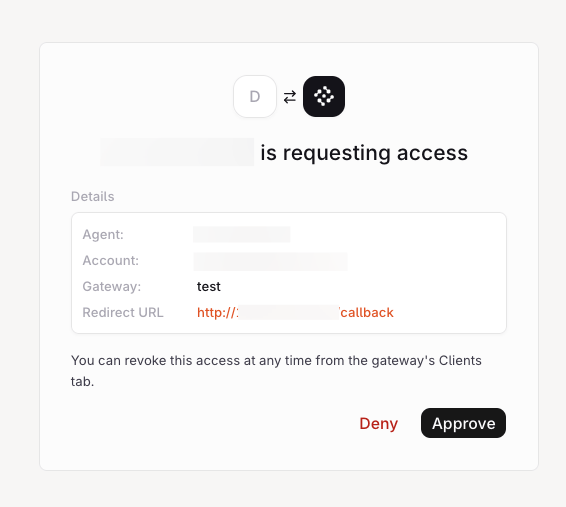
On first use the client opens the browser. The approval page names the client and the MCP Gateway it is requesting access to. Click Approve to issue the token, or Deny to reject the request.
Approval page for an MCP client requesting access to a gateway
Manage authorized clientsEvery authorized client appears on the Clients tab with the client name, when it authenticated, and who created it. Choose Revoke access from a client’s menu to stop the client refreshing its token; the access token it already holds stays valid until it expires, up to 30 minutes.The accounts behind those sign-ins are listed per workspace under Connections, where an admin can disconnect one.
Clients tab on an MCP Gateway listing authorized MCP clients
How sign-in worksThe MCP Gateway implements the MCP authorization specification on top of OAuth 2.0:
Discovery: an unauthenticated request to the gateway returns 401 with a WWW-Authenticate header pointing at the gateway’s metadata documents. The protected-resource document at /.well-known/oauth-protected-resource/v3/mcp/<gateway-key> names the authorization server; the authorization-server document at /.well-known/oauth-authorization-server/v2/auth/mcp, which serves every gateway, lists its endpoints.
Dynamic client registration: the client registers at the authorization server’s registration endpoint, so no client ID or secret needs provisioning in advance.
Authorization code with PKCE: sign-in uses the authorization code flow with Proof Key for Code Exchange (PKCE) and the S256 challenge method, which binds the authorization code to the client that requested it.
The token carries the scopes the client requested, mcp:tools and mcp:resources by default, on this MCP Gateway only. A client registered with the refresh_token grant refreshes it without another sign-in until access is revoked, and a refresh token lasts 7 days; any other client signs in again when the token expires. Each refresh replaces the refresh token; presenting a replaced one more than 60 seconds later revokes the client’s access, and the person signs in again.Authorization server metadata/.well-known/oauth-authorization-server/v2/auth/mcp advertises:
<issuer>/jwks.json, the keys that sign client credentials and ID-JAG access tokens
Client credentials
A pre-registered client authenticates as itself and receives a 10-minute access token bound to one MCP Gateway, without a browser or a refresh token. The client is its own principal and has the same access settings as an API key: project and permissions.
1
Register the client
In Settings → API Keys → OAuth Clients, click + Client. Choose the Client credentials grant, the access (project and permissions), and how the client authenticates:
Client secret (Basic) or Client secret (POST): the secret is shown once after creation. Use Rotate secret to replace it.
Private key JWT: paste a JSON Web Key Set or a JWKS URL with the public keys. The client signs RFC 7523 assertions with RS256, PS256 or ES256.
Only workspace Admins can register, edit, or delete clients. The permissions must include MCP Gateway execution, which new clients have by default. Each client has a managed API key behind it, shown as Managed on the API Keys page; it cannot be used, edited or deleted there. Disabling or deleting the client revokes it. A gateway’s Clients tab lists the OAuth clients that can reach it.
The response carries access_token, token_type, expires_in and the granted scope. Send the token as Authorization: Bearer <access_token> and request a new one before it expires.
3
Authenticate with private_key_jwt
Sign a JWT assertion with the client’s registered key. The assertion carries iss and sub set to the client ID, aud set to the token endpoint, iat, an exp within five minutes, and a unique jti; the header names the registered key in kid. Sign with RS256, PS256, or ES256.
A client can also register through a client metadata document instead of out-of-band registration. Set client_id to an HTTPS URL with a path; the URL must return a JSON document with the same client_id, a client_name, authorization_code in grant_types, redirect_uris, and token_endpoint_auth_method set to none or private_key_jwt. A private_key_jwt document carries exactly one of jwks or jwks_uri, and the document cannot contain client_secret.With the TypeScript MCP SDK, the providers run discovery and the token request:
Client secret
Private key JWT
Python
import { Client } from '@modelcontextprotocol/sdk/client/index.js';import { ClientCredentialsProvider } from '@modelcontextprotocol/sdk/client/auth-extensions.js';import { StreamableHTTPClientTransport } from '@modelcontextprotocol/sdk/client/streamableHttp.js';const authProvider = new ClientCredentialsProvider({ clientId: process.env.ORQ_MCP_CLIENT_ID!, clientSecret: process.env.ORQ_MCP_CLIENT_SECRET!, expectedIssuer: 'https://my.orq.ai/v2/auth/mcp',});const transport = new StreamableHTTPClientTransport( new URL('https://my.orq.ai/v3/mcp/<gateway-key>'), { authProvider },);const client = new Client({ name: 'nightly-sync', version: '1.0.0' });await client.connect(transport);
import { PrivateKeyJwtProvider } from '@modelcontextprotocol/sdk/client/auth-extensions.js';const authProvider = new PrivateKeyJwtProvider({ clientId: process.env.ORQ_MCP_CLIENT_ID!, privateKey: process.env.ORQ_MCP_CLIENT_PRIVATE_KEY!, algorithm: 'RS256', expectedIssuer: 'https://my.orq.ai/v2/auth/mcp',});
Pass authProvider to StreamableHTTPClientTransport as in the client secret example.
Send access_token as a bearer token from any MCP client.
Choose client credentials over an API key when the credential must stay short-lived, use a private key instead of a shared secret, or have its access managed with the client rather than with a long-lived key.
Enterprise-managed authorization
Available with the Enterprise Plan. The company identity provider decides which users may use which MCP clients. A client signed in through SSO asks the identity provider for an Identity Assertion JWT Authorization Grant (ID-JAG) and exchanges it at Orq.ai for a gateway token, so the user never sees the approval page.
In Settings → Auth, open the SSO connection and turn on Accept ID-JAGs from this identity provider under ID-JAG trust. List the Allowed clients: pre-registered client IDs or Client ID Metadata Document URLs. Scopes optionally limit what they may request. OIDC connections trust the SSO issuer only; SAML connections need the Issuer URL the identity provider puts in its ID-JAGs.
3
Configure the identity provider
Register the MCP client at the identity provider and allow token exchange for Orq.ai. The ID-JAG must use:
aud: the authorization server issuer, https://my.orq.ai/v2/auth/mcp.
resource: the gateway URL, https://my.orq.ai/v3/mcp/<gateway-key>, or omit it and send resource in the token request.
The 15-minute token acts as the linked user, with that user’s roles and project access. Only a pre-registered client or a client registered through a metadata document, with full access, can reach the platform MCP server. The sample authenticates a pre-registered client with a secret; a metadata-document client sends its client_id and, with private_key_jwt, a client_assertion, and has no client secret. There is no refresh token: request a new ID-JAG when it expires.
Account linkingOrq.ai links the ID-JAG sub to an account the first time it sees it, and reuses that link afterwards. On first use the ID-JAG must carry email_verified: true and an email in one of the SSO connection’s allowed domains that matches an account already in the workspace. Orq.ai never creates accounts or memberships from an ID-JAG; a request with no matching member is rejected with invalid_grant. Changing the connection’s issuer clears its links.Each ID-JAG is accepted once, must live 10 minutes or less, and is checked against the identity provider’s published keys.
Claude connectors
Claude Enterprise Managed Auth lets members of a Claude organization use an MCP Gateway as a connector without an approval page. Claude signs the ID-JAG under an issuer URL that belongs to that organization, so no SSO connection is needed.
1
Verify the email domain
Verify the members’ email domain in the workspace security settings. Orq.ai only matches addresses on a verified domain.
2
Copy the issuer URL
In Claude, open the connector’s Managed authorization setup, choose Claude-issued as the identity source, and copy the Issuer URL. It looks like https://identity.anthropic.com/issuers/<issuer-id>.
3
Register the issuer
In Settings → Workload federation, click Register issuer and choose Claude as the provider. Paste the Issuer URL exactly as Claude shows it, trailing slash included, and keep Allow ID-JAG sign-in to MCP gateways on.Allowed client IDs starts with Claude’s Client ID Metadata Document URL. Add the ID of a pre-registered client when the connector uses one; it needs the JWT bearer grant. Dynamic Client Registration clients cannot redeem ID-JAGs.
4
Set the tenant ID
Copy Tenant ID for Claude from the issuer into the Tenant ID field of Claude’s managed authorization setup. An ID-JAG that carries it is accepted only by this workspace.
5
Run the connection test
Add the gateway URL, https://my.orq.ai/v3/mcp/<gateway-key>, as a connector in Claude and click Run test under Connection status.
Workspaces of the same organization can register the same issuer, and the tenant ID picks the workspace. Without a tenant ID, the gateway in the token request picks it, and a gateway key that exists in more than one of those workspaces is refused. A workspace in another organization cannot register an issuer that is already in use.Orq.ai matches the whole email against the workspace’s members on every request, ignoring case, and rejects any address that is not on a verified domain. It does not use sub, and it never creates accounts or memberships.
A Claude-issued ID-JAG proves that the user belongs to the Claude organization. It does not prove that they signed in through SSO or used multi-factor authentication.
Tokens last 15 minutes with no refresh token, and Claude requests a new ID-JAG when one expires. A user removed from the Claude organization keeps access until the current token expires.
API key
Pass an API key as a bearer token instead of signing in. Use a user key for a person, so access ends with their membership, or a service-account key for a deployment that must outlive the person who set it up. Set ORQ_API_KEY, then register the MCP Gateway:
VS Code prompts for the API key on first connect and stores it in the OS secret store.
Sessions
Each MCP request stands on its own. There is no gateway session for a client to initialize, keep alive, resume after a reconnect, or clean up.
Monitor Usage
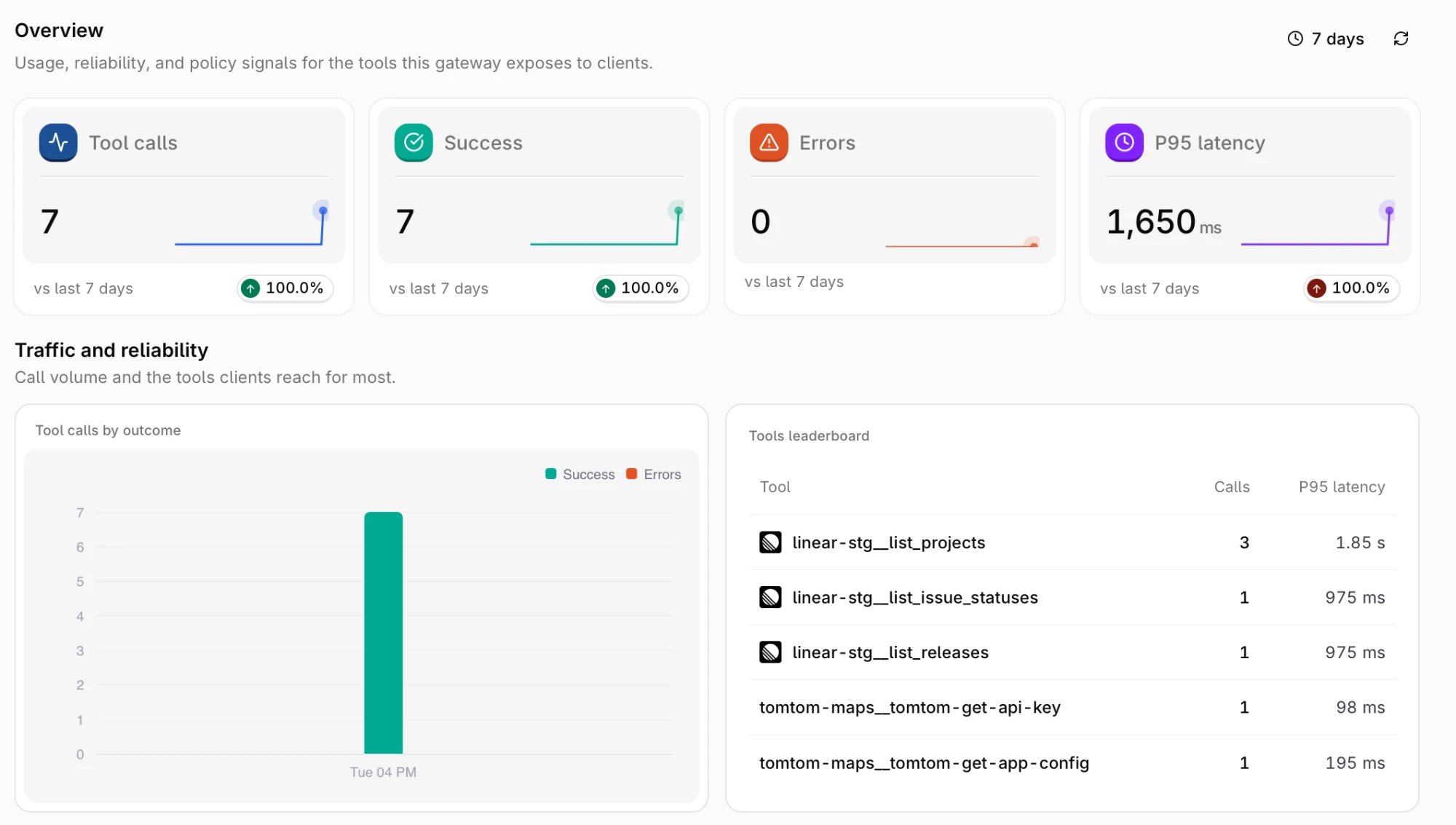
The Overview tab reports how clients use the MCP Gateway. It opens on the last 7 days, and every card compares that window against the one before it. Change the window with the time range picker in the top right.
MCP Gateway Overview tab over the last 7 days
Card
Description
Tool calls
Tool invocations routed through the MCP Gateway.
Success
Invocations that completed successfully.
Errors
Invocations that returned an error.
P95 latency
95th percentile duration of successful invocations.
Traffic and reliability breaks the same window down further:
Tool calls by outcome: call volume over time, split into successes and errors.
Tools leaderboard: the most called tools with their call count and P95 latency, listed under their namespaced names.
Performance adds Tool latency, P50 and P95 over the window, and Calls by upstream server ranked per server.The Traces tab lists the individual tool calls behind these numbers, scoped to this gateway. Each call shows when it started, its status, the tool name, and its duration. Tool calls an Agent makes through an attached gateway are subject to the gateway’s plugins, guardrails and runtime limits, and are recorded here.
Audit Changes
Changes to the MCP Gateway are recorded in Audit Logs, so a change to the exposed tool surface can be traced back to whoever made it.Entries are written under two entity types:
Entity type
Recorded when
MCP Gateway
A gateway is created, updated, or deleted, including changes to its linked servers.
MCP Server
A server is created, updated, or deleted.
Filter by either entity type on the Audit Logs page to see only MCP Portal activity. Entries for both entity types can be exported as a file; see Export audit logs.
Was this page helpful?
Assistant
Responses are generated using AI and may contain mistakes.


 AI Studio

 Claude Code
 Cursor
 Codex
 VS Code